AI Service
The AI Service brings a complete AI platform to your Aegis Stack project: multi-provider chat with Illiana (your system-aware AI assistant), an LLM Catalog with ~2000 models, RAG for codebase-aware conversations, cost tracking with usage analytics, and optional voice (TTS/STT).
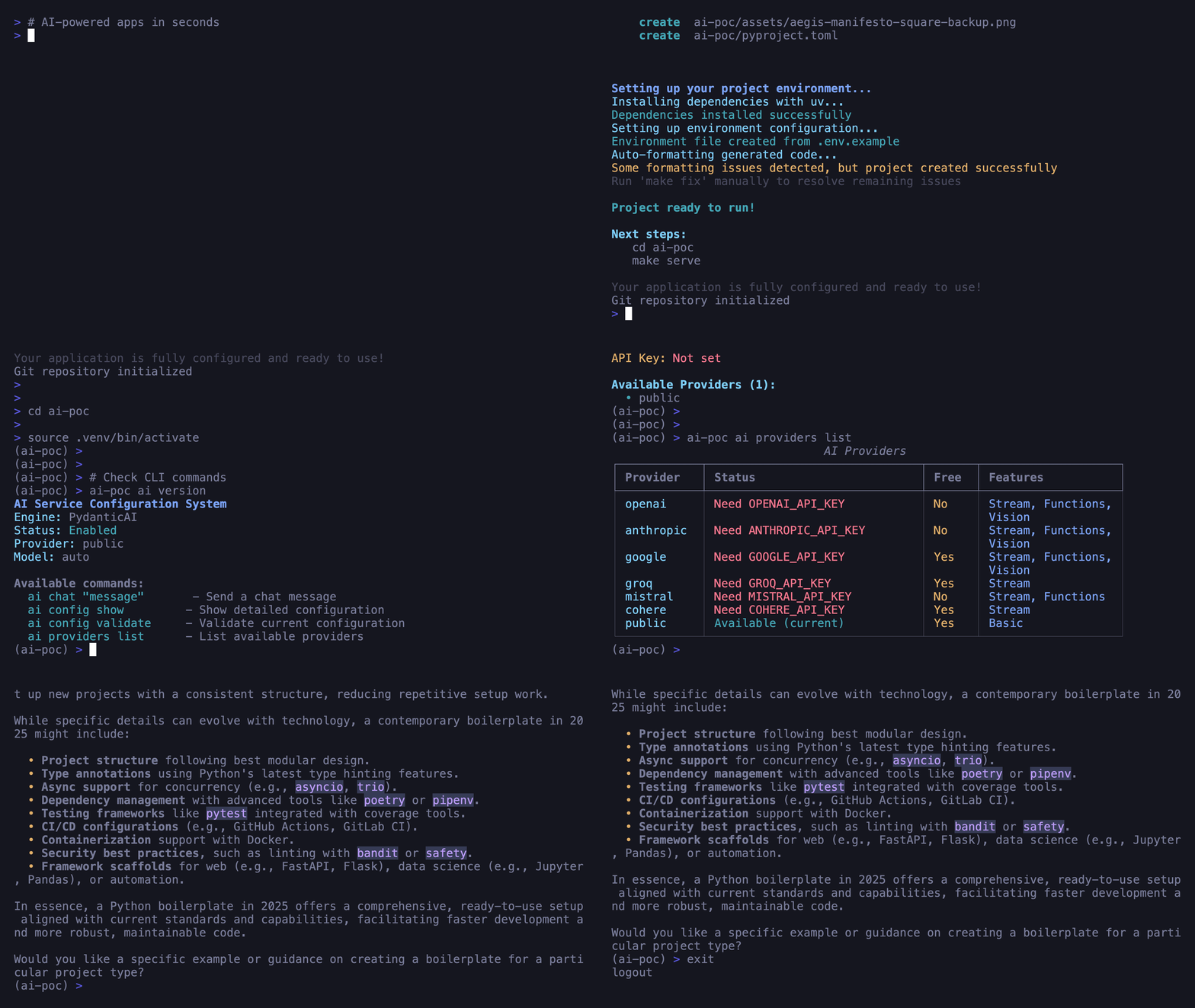
Start Chatting in 30 Seconds
Generate a project with AI service and start chatting with Illiana immediately:
uvx aegis-stack init my-app --services ai
cd my-app
uv sync && source .venv/bin/activate
my-app ai chat "Hello! What can you tell me about my system?"
No API key required with the PUBLIC provider - perfect for testing!
Requires uv installed. See Installation for other options.
What You Get
-
Illiana - System-Aware AI
Conversational assistant with live awareness of your system health, usage stats, and codebase context
-
LLM Catalog
~2000 models from OpenRouter, LiteLLM, and Ollama with pricing, capabilities, and one-command switching
-
RAG
Index your codebase into ChromaDB and let Illiana answer questions with file-level precision
-
Cost Tracking
Automatic per-request usage recording with cost calculation, analytics dashboard, and usage API
-
Voice (TTS/STT)
Text-to-speech and speech-to-text with OpenAI, Groq Whisper, and local providers
-
Multi-Provider
OpenAI, Anthropic, Google, Groq, Mistral, Cohere, Ollama, and free public endpoints
Also included:
- Streaming Responses - Real-time SSE streaming for interactive UX
- Conversation Management - In-memory or database-backed (SQLite/PostgreSQL) persistence
- Slash Commands - In-chat commands (
/model,/rag,/status,/new) - Health Monitoring - Service health checks with validation
- Context Injection - Live system health, usage stats, RAG results, and catalog data injected into Illiana's prompts
Quick Start
1. Generate Project with AI Service
# Basic AI (in-memory conversations)
aegis init my-app --services ai

# AI with database persistence + RAG
aegis init my-app --services "ai[sqlite,rag]"

# AI with everything
aegis init my-app --services "ai[sqlite,rag,voice]"
2. Chat with Illiana
# Interactive chat session
my-app ai chat

# Single message
my-app ai chat "Explain the architecture of this project"

# Chat with RAG (codebase-aware)
my-app rag index ./app --collection code
my-app ai chat --rag --collection code "How does authentication work?"
3. Explore the LLM Catalog
# Sync ~2000 models from cloud APIs
my-app llm sync

# Browse models
my-app llm list claude --vendor anthropic
my-app llm info gpt-4o

# Switch models
my-app llm use claude-sonnet-4-20250514
4. API Usage
# Start server
make serve

# Chat endpoint
curl -X POST http://localhost:8000/ai/chat \
  -H "Content-Type: application/json" \
  -d '{"message": "Hello from the API!"}'

# Browse LLM catalog
curl http://localhost:8000/llm/models?pattern=gpt-4

# Check usage stats
curl http://localhost:8000/ai/usage/stats
Configuration
Basic Configuration
Service Options
Configure AI features at project generation:
| Option | Values | Default | Description |
|---|---|---|---|
| Framework | pydantic-ai, langchain |
pydantic-ai |
AI engine |
| Backend | memory, sqlite, postgres |
memory |
Conversation storage |
| Providers | openai, anthropic, google, groq, mistral, cohere, ollama, public |
public |
LLM providers |
| RAG | flag | disabled | Enable RAG support |
| Voice | flag | disabled | Enable TTS/STT |
Switching Providers
# Via environment variables
AI_PROVIDER=groq
GROQ_API_KEY=your-key-here
AI_MODEL=llama-3.1-8b-instant
# Via CLI (with LLM catalog)
my-app llm use gpt-4o           # Auto-detects OpenAI
my-app llm use claude-sonnet-4-20250514  # Auto-detects Anthropic
Available providers: OpenAI, Anthropic, Google Gemini, Groq, Mistral, Cohere, Ollama, PUBLIC
-> Complete Provider Setup Guide
Next Steps:
- Illiana - System-aware AI assistant with context injection
- LLM Catalog - Browse and manage ~2000 AI models
- RAG - Index your codebase for AI-powered search
- Cost Tracking - Monitor usage and costs
- Voice - Add speech capabilities
- Engines - Choose between Pydantic AI and LangChain
- Provider Setup - Configure your AI provider
- API Reference - Complete REST API documentation
- Service Layer - Integration patterns and architecture
- CLI Commands - Command-line interface reference
- Examples - Real-world usage patterns