Illiana
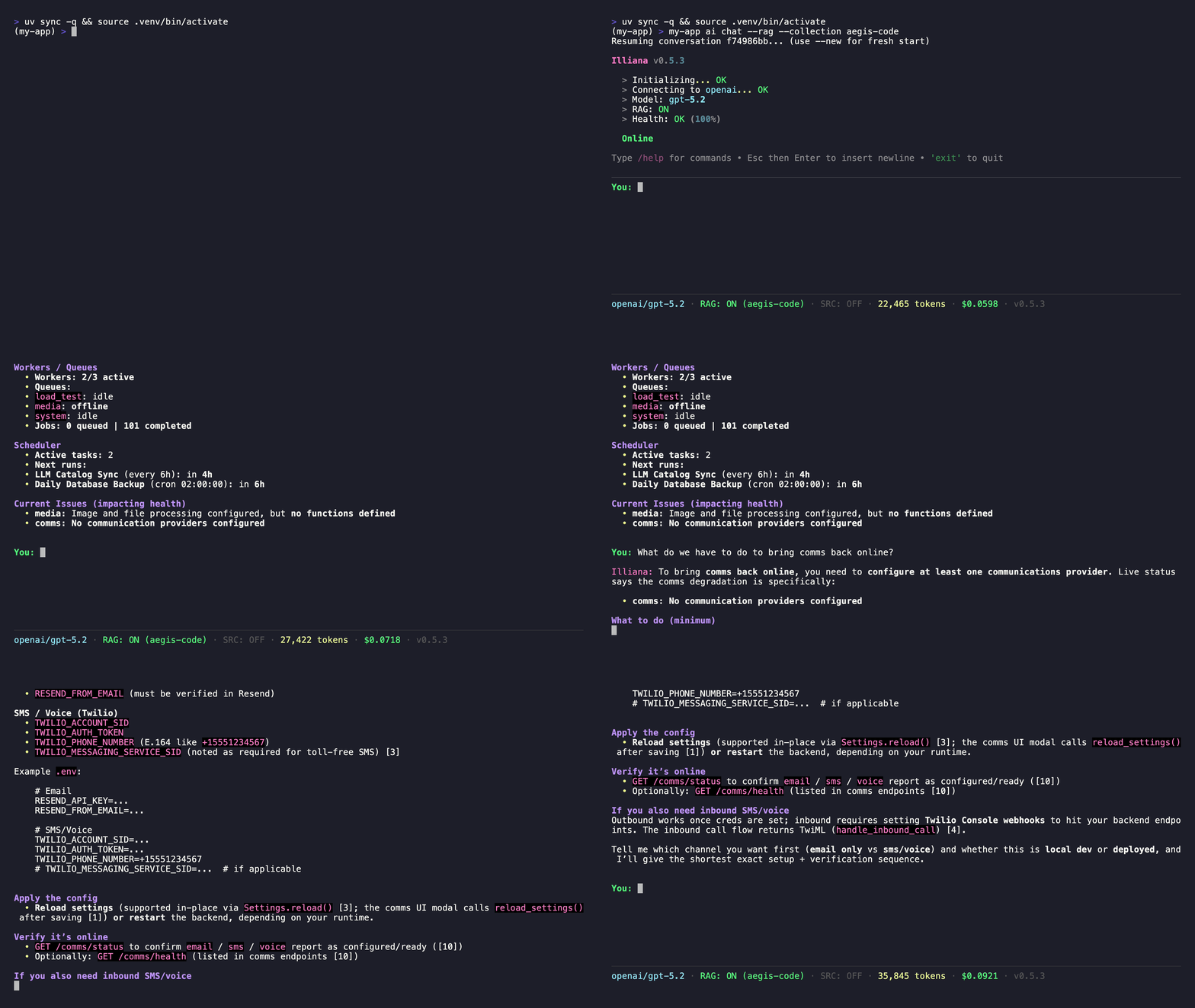
Illiana is the conversational AI interface that ships with every AI-enabled Aegis Stack project. She is not a generic chatbot. She has live awareness of your running system through context injection, and she can search your codebase when RAG is enabled.
She is not required to use Aegis Stack, and nothing in the system depends on her being present. When enabled, she becomes another way to understand what your application is doing and why, alongside the CLI and Overseer.
What Makes Her Different
Illiana receives live data injected into her system prompt before every response. This means she answers based on what your system is actually doing right now, not what it could theoretically do.
| Context | What She Knows | Example Questions |
|---|---|---|
| Health | Component status, uptime, resource usage | "Is my database healthy?" "What's the scheduler doing?" |
| Usage | Her own token consumption, costs, success rate | "How much have I spent today?" "What's my most-used model?" |
| RAG | Your codebase (when indexed) | "How does auth work in this project?" "Where is the scheduler configured?" |
| Catalog | Available models, pricing, capabilities | "What's the cheapest model with vision?" "Compare Claude vs GPT-4o pricing" |
graph TB
    subgraph "AI Service"
        Illiana[Illiana<br/>System-Aware AI Assistant]

        subgraph "Interfaces"
            CLI[CLI Interface<br/>ai chat, llm, rag]
            API[REST API<br/>/ai, /llm, /rag, /voice]
        end

        subgraph "Capabilities"
            Catalog[LLM Catalog<br/>~2000 models]
            RAG[RAG Service<br/>ChromaDB + Embeddings]
            Voice[Voice<br/>TTS + STT]
            Usage[Cost Tracking<br/>Usage Analytics]
        end

        subgraph "Context Injection"
            Health[Health Context]
            UsageCtx[Usage Context]
            RAGCtx[RAG Context]
            CatalogCtx[Catalog Context]
        end

        Providers[Providers<br/>OpenAI, Anthropic, Google<br/>Groq, Mistral, Cohere<br/>Ollama, PUBLIC]
        Conv[Conversations<br/>Memory / SQLite / PostgreSQL]
    end

    Backend[Backend Component<br/>FastAPI]

    Illiana --> CLI
    Illiana --> API
    Illiana --> Providers
    Illiana --> Conv
    Catalog --> Illiana
    RAG --> Illiana
    Usage --> Illiana
    Health --> Illiana
    UsageCtx --> Illiana
    RAGCtx --> Illiana
    CatalogCtx --> Illiana
    API --> Backend

    style Illiana fill:#e8f5e8,stroke:#2e7d32,stroke-width:3px
    style CLI fill:#e1f5fe,stroke:#1976d2,stroke-width:2px
    style API fill:#e1f5fe,stroke:#1976d2,stroke-width:2px
    style Providers fill:#fff3e0,stroke:#f57c00,stroke-width:2px
    style Conv fill:#f3e5f5,stroke:#7b1fa2,stroke-width:2px
    style Catalog fill:#e8f5e8,stroke:#2e7d32,stroke-width:2px
    style RAG fill:#e8f5e8,stroke:#2e7d32,stroke-width:2px
    style Voice fill:#e8f5e8,stroke:#2e7d32,stroke-width:2px
    style Usage fill:#e8f5e8,stroke:#2e7d32,stroke-width:2px
    style Backend fill:#e1f5fe,stroke:#1976d2,stroke-width:2px
Getting Started
# Generate a project with AI
aegis init my-app --services "ai[sqlite,rag]"
cd my-app && uv sync && source .venv/bin/activate

# Start chatting
my-app ai chat
Illiana v0.6.4
Provider: public | Model: auto

You: What can you tell me about my system?
Illiana: I can see your system is running with...
With Codebase Context
Index your code so Illiana can reference specific files and line numbers:
# Index your codebase
my-app rag index ./app --collection code --extensions .py

# Chat with RAG enabled
my-app ai chat --rag --collection code --top-k 20 --sources
Now she answers from your actual code instead of generic knowledge:
You: How does the auth service validate tokens?
Illiana: Based on your codebase, token validation happens in
app/services/auth/service.py [1]. The validate_token() method...

Sources:
[1] app/services/auth/service.py:42
[2] app/components/backend/api/auth/router.py:15
Slash Commands
During interactive chat, use slash commands for quick actions:
| Command | Description |
|---|---|
/help |
Show available commands |
/model [name] |
Show current model or switch to a new one |
/status |
Show current configuration |
/new |
Start a new conversation |
/rag [off\|collection] |
Toggle RAG mode or select collection |
/sources [enable\|disable] |
Toggle source references in output |
/clear |
Clear the screen |
/exit |
Exit the chat session |
Switching Models Mid-Conversation
You: /model gpt-4o
✓ Switched to OpenAI/gpt-4o

You: /model claude-sonnet-4-20250514
✓ Switched to Anthropic/claude-sonnet-4-20250514
Tab completion is available for model names (populated from Ollama and configured cloud providers).
RAG Controls
You: /rag code
✓ RAG enabled with collection: code

You: /sources enable
✓ Source references enabled

You: /rag off
RAG disabled
Context Injection
Illiana's system prompt is assembled dynamically before every response. Four context formatters inject live data:
Health Context
Source: app/services/ai/health_context.py
Injects component health status. Illiana reports what is running, not what could run.
Usage Context
Source: app/services/ai/usage_context.py
Gives Illiana awareness of her own activity: tokens consumed, costs, success rates. Supports a compact mode for smaller models (Ollama) where context window is limited.
RAG Context
Source: app/services/ai/rag_context.py
When RAG is enabled, search results are formatted as markdown with file names, line numbers, and syntax highlighting. Illiana is instructed to answer from this code, not generic knowledge.
LLM Catalog Context
Source: app/services/ai/llm_catalog_context.py
Top models per featured vendor (OpenAI, Anthropic, Google, xAI, Mistral, Groq, DeepSeek) with pricing and capabilities. This lets Illiana recommend models when asked.
Prompt Assembly
Source: app/services/ai/prompts.py
All contexts are combined via build_system_prompt(). Health context is injected last so the LLM weights it more heavily for status questions.
Chat Modes
Single Message
Interactive Session
Features:
- Conversation memory (context maintained during session)
- Markdown rendering in terminal
- Streaming responses
- Slash commands
- Tab completion for models and collections
With RAG
my-app ai chat --rag --collection code --top-k 20 --sources \
  "How does the scheduler component work?"
| Flag | Description |
|---|---|
--rag |
Enable RAG context |
--collection |
Collection to search |
--top-k |
Number of search results to include |
--sources |
Show source file references after response |
API Access
Illiana is also accessible via the REST API:
# Chat
curl -X POST http://localhost:8000/ai/chat \
  -H "Content-Type: application/json" \
  -d '{"message": "What is the health of my system?"}'

# Stream
curl -X POST http://localhost:8000/ai/chat/stream \
  -H "Content-Type: application/json" \
  -d '{"message": "Explain the auth service"}' \
  --no-buffer
See API Reference for full endpoint documentation.
Configuration
Illiana uses the same configuration as the AI service:
# .env
AI_ENABLED=true
AI_PROVIDER=public      # or openai, anthropic, groq, ollama, etc.
AI_MODEL=auto
AI_TEMPERATURE=0.7
AI_MAX_TOKENS=1000
Switch models at any time:
Next Steps:
- RAG - Index your codebase for Illiana to search
- LLM Catalog - Browse and switch models
- Provider Setup - Configure AI providers
- CLI Commands - Complete CLI reference