Voice (TTS/STT)
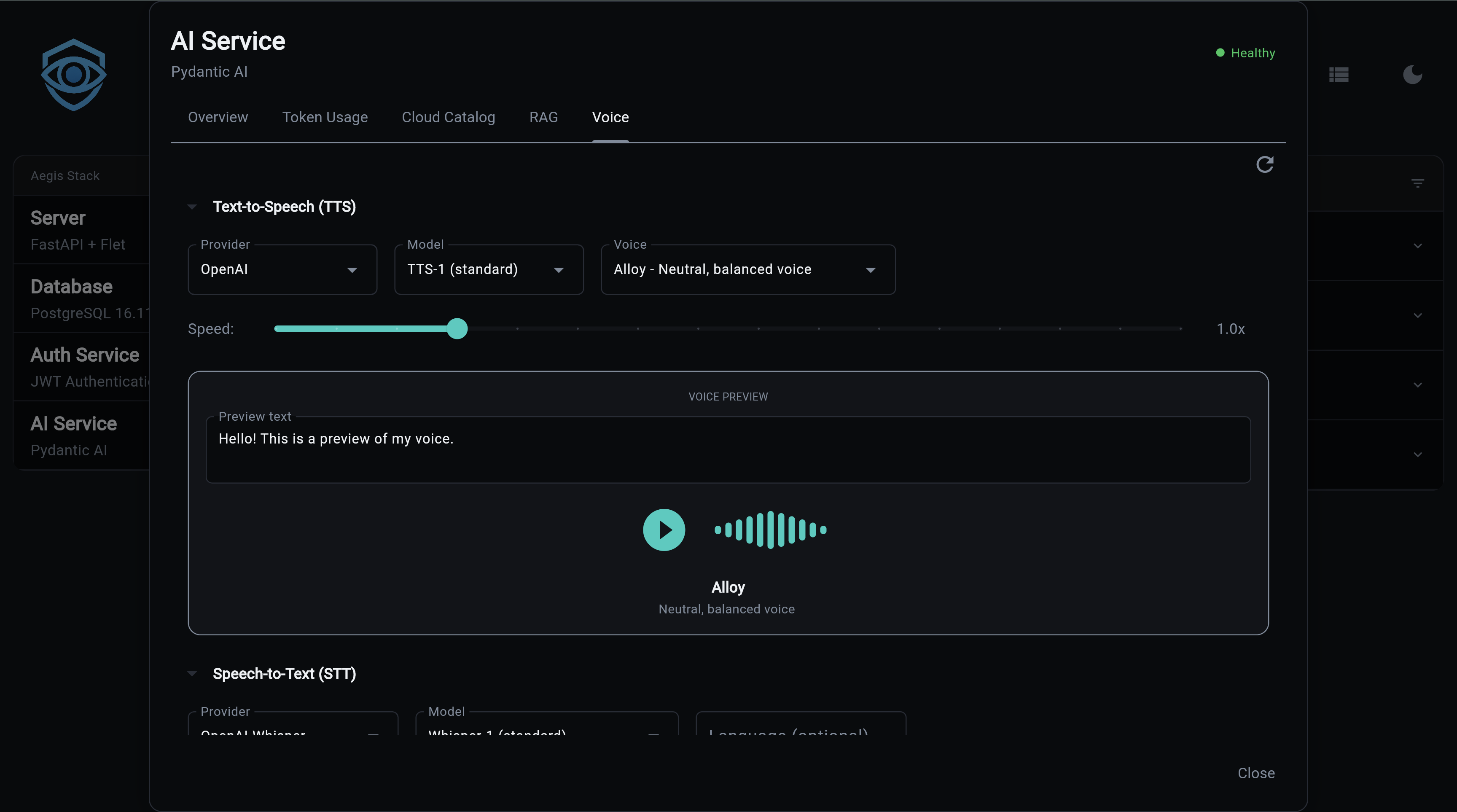
Voice capabilities add Text-to-Speech (TTS) and Speech-to-Text (STT) to the AI service. Multiple providers are supported, from cloud APIs to fully local inference.
Experimental Feature
Voice is currently experimental. Some features may not work out of the box and will require configuration on your part. For example, TTS and STT providers that need API keys (like OpenAI) may return errors or hang in the frontend if the key is not set. Make sure your provider credentials are configured before using voice features.
Enable at Project Generation
Voice is an optional feature enabled at project generation:
What You Get
- Text-to-Speech - Convert text to audio with multiple voices and speed control
- Speech-to-Text - Transcribe audio with timestamps and segment detection
- Multiple providers - Cloud (OpenAI, Groq) and local (Whisper, faster-whisper)
- Voice catalog - Browse providers, models, and voices via API
- Voice previews - Generate audio samples to compare voices
- Usage tracking - TTS and STT operations tracked alongside LLM usage
TTS Providers
| Provider | Type | Models | Voices | Streaming | API Key |
|---|---|---|---|---|---|
| OpenAI | Cloud | tts-1, tts-1-hd | alloy, echo, fable, onyx, nova, shimmer | Yes | OPENAI_API_KEY |
OpenAI TTS
Two models available:
- tts-1 - Optimized for speed, lower latency
- tts-1-hd - Higher quality audio, slightly slower
Six voices: alloy, echo, fable, onyx, nova, shimmer
# .env configuration
TTS_PROVIDER=openai
TTS_MODEL=tts-1
TTS_VOICE=alloy
TTS_SPEED=1.0   # 0.25 to 4.0
STT Providers
| Provider | Type | Model | Speed | Quality | Requires |
|---|---|---|---|---|---|
| OpenAI Whisper | Cloud | whisper-1 | Good | High | OPENAI_API_KEY |
| Groq Whisper | Cloud | whisper-large-v3-turbo | Very fast | High | GROQ_API_KEY |
| Local Whisper | Local | whisper-tiny to large-v3 | Varies | Varies | transformers, torch |
| faster-whisper | Local | tiny to large-v3 | 4x faster | High | faster-whisper |
OpenAI Whisper
Cloud-based transcription with segment timestamps:
Groq Whisper
Ultra-fast cloud transcription:
Local Whisper
Runs on your machine via HuggingFace transformers. Auto-detects GPU (CUDA, MPS) or falls back to CPU:
Requires: uv add transformers torch
faster-whisper
SYSTRAN's optimized implementation - 4x faster than standard Whisper with similar accuracy:
Requires: uv add faster-whisper
Supports compute types: default, float16, int8
API Endpoints
All endpoints are prefixed with /voice.
TTS Catalog
# List TTS providers
curl http://localhost:8000/voice/catalog/tts/providers | jq

# List models for a provider
curl http://localhost:8000/voice/catalog/tts/openai/models | jq

# List voices for a provider
curl http://localhost:8000/voice/catalog/tts/openai/voices | jq
Provider Response:
{
  "id": "openai",
  "name": "OpenAI",
  "type": "tts",
  "requires_api_key": true,
  "api_key_env_var": "OPENAI_API_KEY",
  "is_local": false,
  "description": "OpenAI TTS API"
}
Voice Response:
{
  "id": "alloy",
  "name": "Alloy",
  "provider_id": "openai",
  "model_ids": ["tts-1", "tts-1-hd"],
  "description": "A balanced, versatile voice",
  "category": "neutral",
  "gender": "neutral",
  "preview_text": "Hello, I'm Alloy..."
}
STT Catalog
# List STT providers
curl http://localhost:8000/voice/catalog/stt/providers | jq

# List models for a provider
curl http://localhost:8000/voice/catalog/stt/openai_whisper/models | jq
Voice Settings
# Get current settings
curl http://localhost:8000/voice/settings | jq

# Preview settings (returns merged config without persisting)
curl -X POST http://localhost:8000/voice/settings \
  -H "Content-Type: application/json" \
  -d '{"tts_voice": "nova", "tts_speed": 1.2}'
Note
This endpoint returns what the settings would look like if applied. To actually persist changes, update the corresponding environment variables in your .env file.
Settings fields: tts_provider, tts_model, tts_voice, tts_speed, stt_provider, stt_model, stt_language
Voice Preview
Generate audio samples to compare voices:
# POST with body
curl -X POST http://localhost:8000/voice/preview \
  -H "Content-Type: application/json" \
  -d '{"voice_id": "alloy", "text": "Hello world"}' \
  --output preview.mp3

# GET (browser-friendly)
curl "http://localhost:8000/voice/preview/alloy?text=Hello+world&speed=1.0" \
  --output preview.mp3
Returns audio/mpeg content.
Catalog Summary
{
  "tts": {
    "provider_count": 1,
    "model_count": 2,
    "voice_count": 6,
    "providers": ["openai"]
  },
  "stt": {
    "provider_count": 4,
    "model_count": 4,
    "providers": ["openai_whisper", "whisper_local", "faster_whisper", "groq_whisper"]
  },
  "current_config": {
    "tts_provider": "openai",
    "tts_model": "tts-1",
    "tts_voice": "alloy",
    "stt_provider": "openai_whisper",
    "stt_model": "whisper-1"
  }
}
Configuration
| Variable | Default | Description |
|---|---|---|
TTS_PROVIDER |
openai |
TTS provider |
TTS_MODEL |
tts-1 |
TTS model |
TTS_VOICE |
alloy |
Default voice |
TTS_SPEED |
1.0 |
Speed multiplier (0.25-4.0) |
STT_PROVIDER |
openai_whisper |
STT provider |
STT_MODEL |
whisper-1 |
STT model |
STT_LANGUAGE |
auto-detect | Language for transcription |
Data Models
TTS
- SpeechRequest -
text,voice,speed - SpeechResult -
audio(bytes),format(MP3),provider
STT
- AudioInput -
content(bytes),format,language - TranscriptionResult -
text,language,duration_seconds,provider,segments - TranscriptionSegment -
text,start,end,confidence
Source Files
| File | Purpose |
|---|---|
app/services/ai/voice/tts/providers.py |
TTS provider implementations |
app/services/ai/voice/tts/service.py |
TTS service |
app/services/ai/voice/tts/config.py |
TTS configuration |
app/services/ai/voice/tts/usage.py |
TTS usage tracking |
app/services/ai/voice/stt/providers.py |
STT provider implementations |
app/services/ai/voice/stt/service.py |
STT service |
app/services/ai/voice/stt/config.py |
STT configuration |
app/services/ai/voice/stt/usage.py |
STT usage tracking |
app/services/ai/voice/catalog.py |
Voice catalog (providers, models, voices) |
app/services/ai/voice/models.py |
Data models |
app/components/backend/api/voice/router.py |
API endpoints |
Next Steps:
- AI Service Overview - Getting started
- Provider Setup - Configure AI providers
- API Reference - All REST endpoints
- CLI Commands - Command-line interface