RAG (Retrieval-Augmented Generation)
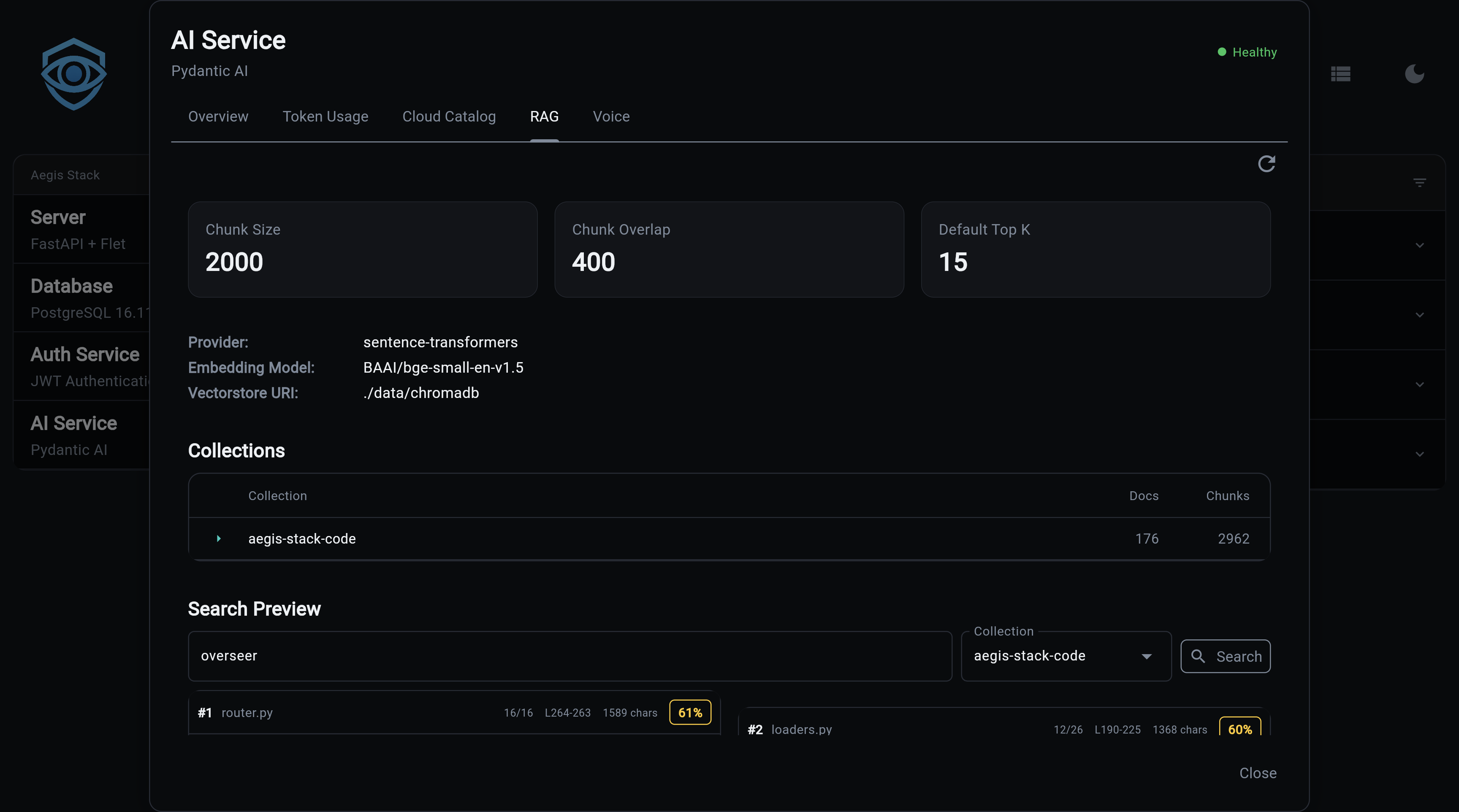
RAG enables semantic search over your codebase or documents. Index files into ChromaDB collections, then search them directly or let Illiana use them as context during conversations.
What You Get
- Codebase-aware AI - Illiana answers questions using your actual code, not generic knowledge
- Semantic search - Find relevant code by meaning, not just keyword matching
- ChromaDB backend - Persistent vector store with efficient similarity search
- Dual embedding providers - Local sentence-transformers (~400MB, free) or OpenAI API
- File-level management - Add, update, or remove individual files from collections
- CLI and API - Full access via command line and REST endpoints
Quick Start
# 1. Generate project with RAG enabled
aegis init my-app --services "ai[sqlite,rag]"
cd my-app && uv sync && source .venv/bin/activate

# 2. Index your codebase
my-app rag index ./app --collection code --extensions .py

# 3. Search your code
my-app rag search "how does authentication work" --collection code

# 4. Chat with codebase context
my-app ai chat --rag --collection code --top-k 20 --sources \
  "Explain how the auth service validates tokens"
Architecture
graph LR
    Files[Source Files] --> Loader[Document Loader]
    Loader --> Chunker[Chunker]
    Chunker --> Embedder[Embedding Model]
    Embedder --> ChromaDB[(ChromaDB)]

    Query[Search Query] --> Embedder2[Embedding Model]
    Embedder2 --> ChromaDB
    ChromaDB --> Results[Ranked Results]
    Results --> Illiana[Illiana Prompt]

    style ChromaDB fill:#e8f5e8,stroke:#2e7d32
    style Illiana fill:#f3e5f5,stroke:#7b1fa2
Pipeline
- Loading -
CodebaseLoaderreads files, applies default and configured exclude patterns, and extracts metadata (path, name, extension) - Chunking -
DocumentChunkersplits documents into configurable-size chunks with overlap, preserving line numbers - Embedding - Text chunks are converted to vectors using sentence-transformers (local) or OpenAI API
- Indexing - Vectors are stored in ChromaDB with metadata for retrieval
- Search - Query text is embedded and compared against stored vectors using cosine similarity
CLI Commands
rag index
Index documents from a path into a collection:
# Index a directory
my-app rag index ./app --collection code

# Filter by extension
my-app rag index ./app --collection code --extensions .py,.ts
╭──────── Collection: code ─────────╮
│ Successfully indexed 1,523 chunks │
│ from 87 files                     │
│                                    │
│ Extensions: .py                   │
│ Duration: 8.3s                    │
│   Loading:  1.2s (14%)            │
│   Chunking: 0.8s (10%)           │
│   Indexing: 6.3s (76%)           │
│ Throughput: 183.5 chunks/sec     │
│ Collection size: 1,523 chunks    │
╰────────────────────────────────────╯
rag add
Add or update a single file (upsert semantics):
my-app rag add app/services/auth.py --collection code
my-app rag add app/services/auth.py -c code --show-ids
rag remove
Remove a file's chunks from the collection:
my-app rag remove /path/to/file.py --collection code
my-app rag remove /path/to/file.py -c code --force
rag files
List indexed files with chunk counts:
rag search
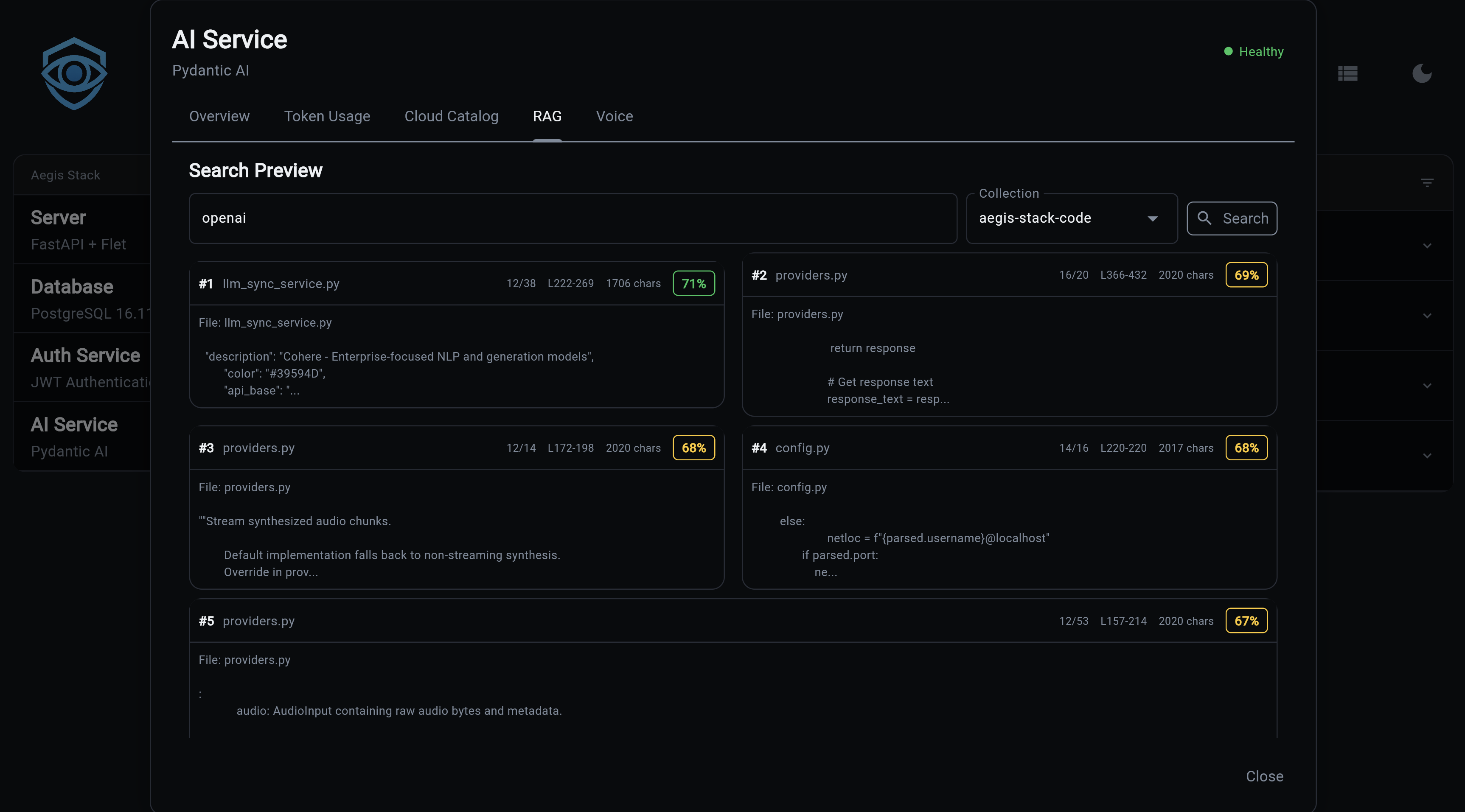
Semantic search across indexed documents:
# Basic search
my-app rag search "how does authentication work" --collection code

# Show full content of results
my-app rag search "database connection" -c code --content

# More results
my-app rag search "error handling" -c code --top-k 10
Results show relevance scores and file references:
Found 5 results:

╭── #1 service.py ──────────────────╮
│ Score: 0.8932                     │
│                                    │
│ class AuthService:                │
│     async def validate_token(...  │
╰── app/services/auth/service.py ───╯
rag list
List all collections with document counts:
rag delete
Delete a collection and all its documents:
rag status
Show RAG service configuration:
╭──────── RAG Service Status ────────╮
│ Enabled: Yes                       │
│ Persist Directory: .chromadb       │
│ Embedding Model: all-MiniLM-L6-v2 │
│ Model Status: Installed            │
│ Chunk Size: 1000                   │
│ Chunk Overlap: 200                 │
│ Default Top K: 5                   │
│ Collections: 2                     │
╰────────────────────────────────────╯
rag install-model
Pre-download the embedding model for offline/air-gapped use:
# Download to default location (~400MB)
my-app rag install-model

# Custom cache directory
my-app rag install-model --cache-dir /path/to/models

# Specific model
my-app rag install-model --model sentence-transformers/all-MiniLM-L6-v2
Note
Only needed for local sentence-transformers. OpenAI embeddings don't require a local download.
API Endpoints
All endpoints are prefixed with /rag.
POST /rag/index
Index documents from a path.
// Request
{
  "path": "./app",
  "collection_name": "code",
  "extensions": [".py", ".ts"],
  "exclude_patterns": ["**/test_*"]
}

// Response
{
  "collection_name": "code",
  "documents_added": 1523,
  "total_documents": 1523,
  "duration_ms": 8300.5
}
POST /rag/search
Semantic search across a collection.
// Request
{
  "query": "how does authentication work",
  "collection_name": "code",
  "top_k": 5,
  "filter_metadata": null
}

// Response
{
  "query": "how does authentication work",
  "collection_name": "code",
  "results": [
    {
      "content": "class AuthService:\n    ...",
      "metadata": {"source": "app/services/auth/service.py"},
      "score": 0.8932,
      "rank": 1
    }
  ],
  "result_count": 5
}
GET /rag/collections
List all collection names.
GET /rag/collections/{name}
Get collection info (name, document count, metadata).
GET /rag/collections/{name}/files
List indexed files with chunk counts.
DELETE /rag/collections/{name}
Delete a collection.
GET /rag/health
RAG service health status and configuration.
Embedding Providers
| Provider | Type | Cost | Speed | Setup |
|---|---|---|---|---|
| sentence-transformers | Local | Free | Moderate | ~400MB download, auto on first use |
| OpenAI | Cloud API | Per-token | Fast | Requires OPENAI_API_KEY |
sentence-transformers (Default)
Runs entirely locally. The model downloads automatically on first use (~400MB). No API key needed.
OpenAI Embeddings
Cloud-based, faster for large datasets. Requires an API key.
Configuration
Environment variables for RAG:
| Variable | Default | Description |
|---|---|---|
RAG_EMBEDDING_PROVIDER |
sentence-transformers |
sentence-transformers or openai |
RAG_EMBEDDING_MODEL |
all-MiniLM-L6-v2 |
Embedding model name |
RAG_MODEL_CACHE_DIR |
system default | Local model cache path |
RAG_CHUNK_SIZE |
1000 |
Characters per chunk |
RAG_CHUNK_OVERLAP |
200 |
Overlap between chunks |
RAG_DEFAULT_TOP_K |
5 |
Default search results count |
Chat Integration
CLI Flags
my-app ai chat --rag --collection code --top-k 20 --sources \
  "How does the scheduler component work?"
| Flag | Description |
|---|---|
--rag |
Enable RAG context for this chat |
--collection |
Collection to search |
--top-k |
Number of results to include (default: 5) |
--sources |
Show source file references after response |
Slash Commands (Interactive)
/rag              Show RAG status
/rag code         Enable RAG with collection "code"
/rag off          Disable RAG
/sources          Toggle source references
/sources enable   Enable source references
Context Injection
When RAG is enabled, search results are injected into Illiana's system prompt via two context objects:
RAGContext (app/services/ai/rag_context.py):
- format_for_prompt() - Markdown with file names, line numbers, syntax highlighting
- format_sources_footer() - Citation-style source references ([1] app/services/auth.py:42)
- to_metadata() - Storage-friendly format for conversation metadata
RAGStatsContext (app/services/ai/rag_stats_context.py):
- Collection-level awareness (count, names, document counts)
- Embedding model and chunking configuration
- Formatted for compact prompt injection
Source Files
| File | Purpose |
|---|---|
app/services/rag/service.py |
Core RAG service |
app/services/rag/config.py |
Configuration |
app/services/rag/loaders.py |
Document loading |
app/services/rag/chunking.py |
Text chunking |
app/services/rag/vectorstore.py |
ChromaDB wrapper |
app/services/ai/rag_context.py |
Prompt context formatting |
app/services/ai/rag_stats_context.py |
Stats context |
app/cli/rag.py |
CLI commands |
app/components/backend/api/rag/router.py |
API endpoints |
Next Steps:
- Cost Tracking - Usage analytics
- LLM Catalog - Model registry
- CLI Commands - Complete CLI reference
- API Reference - All REST endpoints