Authentication Integration
This page covers how the auth service plugs into the backend: which middleware it adds, where its rate limiting comes from, and how its routers are registered. For the auth service itself (auth levels, JWT configuration, OAuth providers, password hashing), see the Authentication service docs.
When the auth service is enabled at aegis init time, three things
happen on the backend side. None of them require manual wiring; they
flow out of Aegis's discovery model.
1. SessionMiddleware (OAuth Only)
If you enable an OAuth social provider,
app/components/backend/middleware/session.py is generated. The
middleware auto-discovery loop picks it up and
registers Starlette's SessionMiddleware.
Why a session cookie when JWTs handle the post-login flow? Authlib's
authorize_redirect stashes the OAuth state token and the PKCE
verifier in the session between /start and /callback. Without the
middleware the round-trip cannot be verified and login silently fails.
Two settings:
OAUTH_SESSION_SECRET: signs the session cookie. Generate a fresh value per environment.SESSION_COOKIE_SECURE: explicit override of thehttps_onlyflag. When unset, Aegis marks the cookie secure in every environment exceptAPP_ENV=dev. Set it tofalseonly if you are intentionally serving production over plain HTTP, otherwise the browser will silently drop the cookie and OAuth round-trips will fail.
This middleware affects all requests, not just OAuth ones, because it has to be in the stack before the OAuth router runs. The cookie is only set when an OAuth flow actually uses it.
2. Rate Limiting On Auth Endpoints
Rate limiting lives in
app/components/backend/security/rate_limit.py. The module exposes
three shared in-memory RateLimiter instances plus a thin
Depends-able wrapper for each:
# app/components/backend/security/rate_limit.py
login_limiter           = RateLimiter(...)
register_limiter        = RateLimiter(...)
password_reset_limiter  = RateLimiter(...)

def login_rate_limit(request: Request) -> None: ...
def register_rate_limit(request: Request) -> None: ...
def password_reset_rate_limit(request: Request) -> None: ...
The dependency callables are re-exported from
app/components/backend/api/deps.py, which is the canonical import
surface for FastAPI deps. Route handlers stay ignorant of the
implementation module:
from fastapi import APIRouter, Depends
from app.components.backend.api.deps import login_rate_limit

router = APIRouter()

@router.post("/login")
async def login(_: None = Depends(login_rate_limit), ...):
    ...
The auth routes use this pattern out of the box. To rate-limit your own
endpoint with a different budget, define a new limiter and dependency
in security/rate_limit.py, re-export from api/deps.py, and add the
Depends(...) to your route signature.
The limiter's window and burst are pulled from settings, so tuning
happens in .env rather than in code:
| Setting | What it controls |
|---|---|
RATE_LIMIT_LOGIN_MAX / RATE_LIMIT_LOGIN_WINDOW |
Login attempts per window |
RATE_LIMIT_REGISTER_MAX / RATE_LIMIT_REGISTER_WINDOW |
Registration and password-reset attempts |
TRUST_PROXY_HEADERS |
Read client IP from X-Forwarded-For when behind a reverse proxy |
Because the state is in-process, this is appropriate for single-instance deployments. If you horizontally scale the backend, swap the in-memory counter for a Redis-backed implementation — the dependency shape stays the same.
3. Router Registration
api/routing.py mounts the auth surface explicitly under
/api/v1:
if include_auth:
    app.include_router(auth_router, prefix="/api/v1")

if include_oauth:
    app.include_router(oauth_router, prefix="/api/v1")

if include_auth_org:
    app.include_router(org_router, prefix="/api/v1")
The inner routers bring their own tags, so they group correctly in Swagger and in Overseer's Routes tab without needing a tag at the registration call site.
What Changes In Overseer When Auth Is Enabled
The most immediate change is the front door: Overseer itself stops
being open. The dashboard route is gated on an authenticated session,
so visiting /dashboard/ redirects to a login screen.
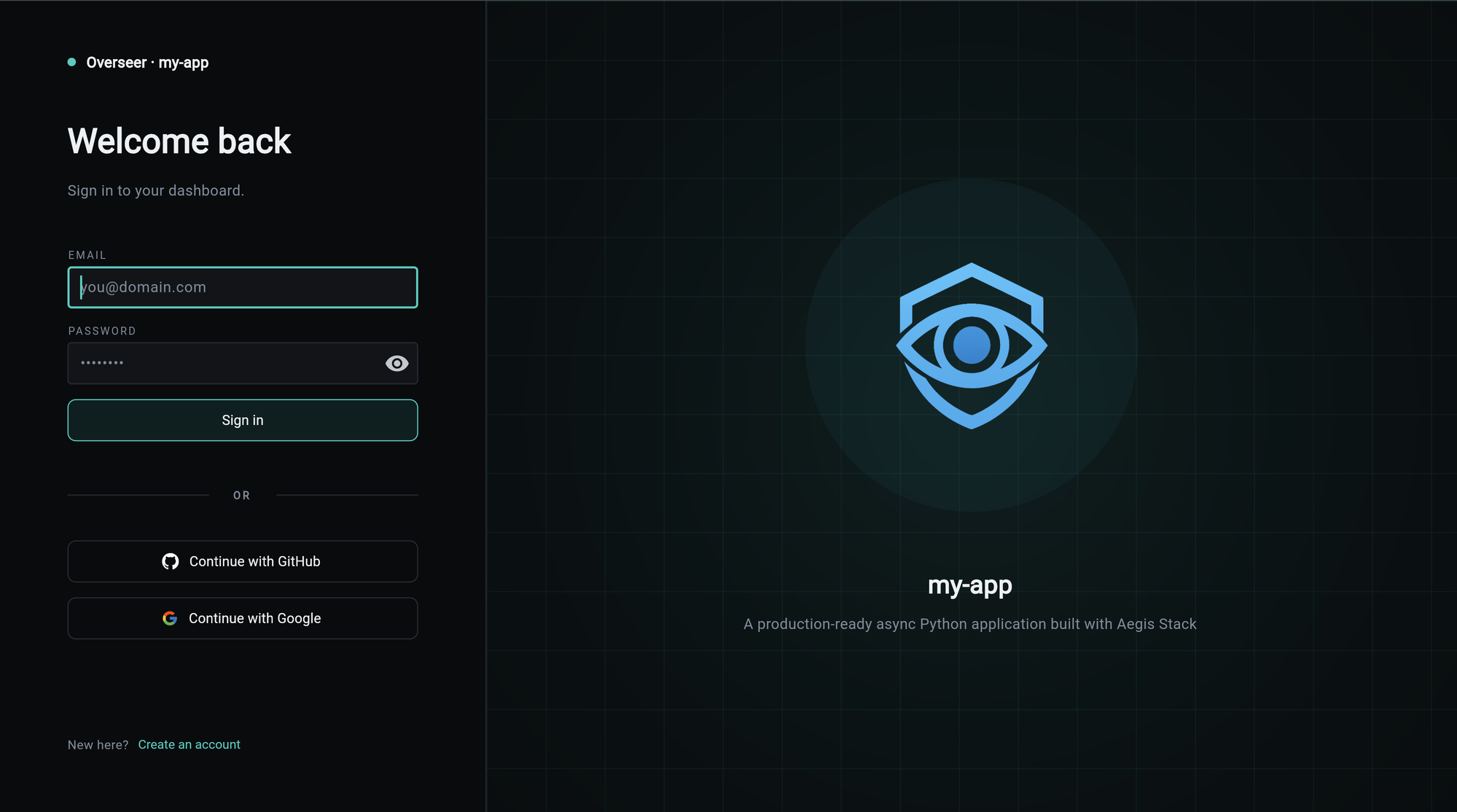
The email and password form and the "Create an account" link ship
with the base auth service. The OAuth panel below the divider only
exists when the project was generated with auth[oauth], which is
what brings the SessionMiddleware and OAuth routes online. See
Authentication Integration above.
Once you're signed in, the dashboard surfaces the rest of the auth-aware changes:
- Protected modals: service modals that expose sensitive data (auth, insights, anything with PII or write actions) require an authenticated session before they open. An unauthenticated session sees the cards but cannot drill into them.
- Lifecycle tab: an additional middleware row for
SessionMiddleware(OAuth only). Thecomponent_healthstartup hook also registers an auth service health check, which surfaces on the dashboard. - Routes tab: a new tag group for
authentication(andoauth,orgswhere enabled). Protected endpoints display a security badge because they declare a dependency on the auth resolver. - Health endpoints:
/healthcontinues to be open. The auth service's internal checks (JWT secret presence, password hashing backend) are surfaced through the Overseer dashboard rather than the public/healthpayload.
What This Page Does Not Cover
The service-level concerns live in the Authentication service docs:
- Auth levels and per-endpoint protection.
- JWT signing keys and cookie behavior.
- Password hashing.
- OAuth provider configuration.
- The auth CLI commands.
If you are extending the auth surface, start there. If you are wiring a new component or service that needs to know what the backend already adds on auth's behalf, this page is the right reference.